SourceLink
Description
The SourceLink property can simply be understood as text that represents a link between two elements. It is similar to the String Property in the way it is stored.
| Feature | Value |
|---|---|
| Theme injectable | ✗ |
| Possible Inputs | A-Z, a-z, Any numeric value (integer or decimal), Special characters |
SourceLink Elements
Wrapper
Represents the type of wrapper the broadcaster is supposed to be located in.
y-page
Wrapper ID
This is basically the identification of the wrapper.
y-page:1
Element
Stands for the element inside the wrapper and is therefore the broadcaster we want to receive something from.
y-page:1:y-table
Element ID
This is basically the identification of the element.
y-page:1:y-table:3
Event
Defines the specific event we want to listen to from our broadcaster element.
y-page:1:y-table:3:select-row
Collection
Optional: Only applies for yTable or Clipboard! Defines the specific event data we want to receive - for example a certain data property of a Clipboard.
y-page:1:y-table:3:select-row:mypropertyone
Occurrences
Toolbar
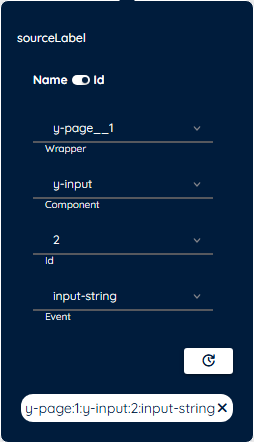
You can conveniently set important SourceLinks in the Toolbar directly using a Toolbar Extension with a SourceLink Picker.
Detail Panel
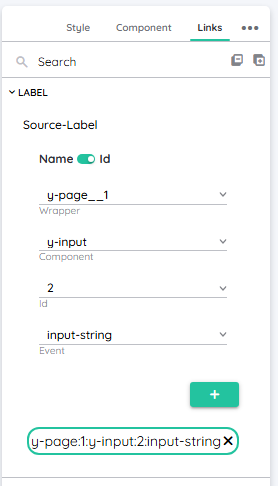
You can find all source links of a component in the Detail Panel under the category "Links". You will also use the SourceLink Picker to create a new SourceLink here.